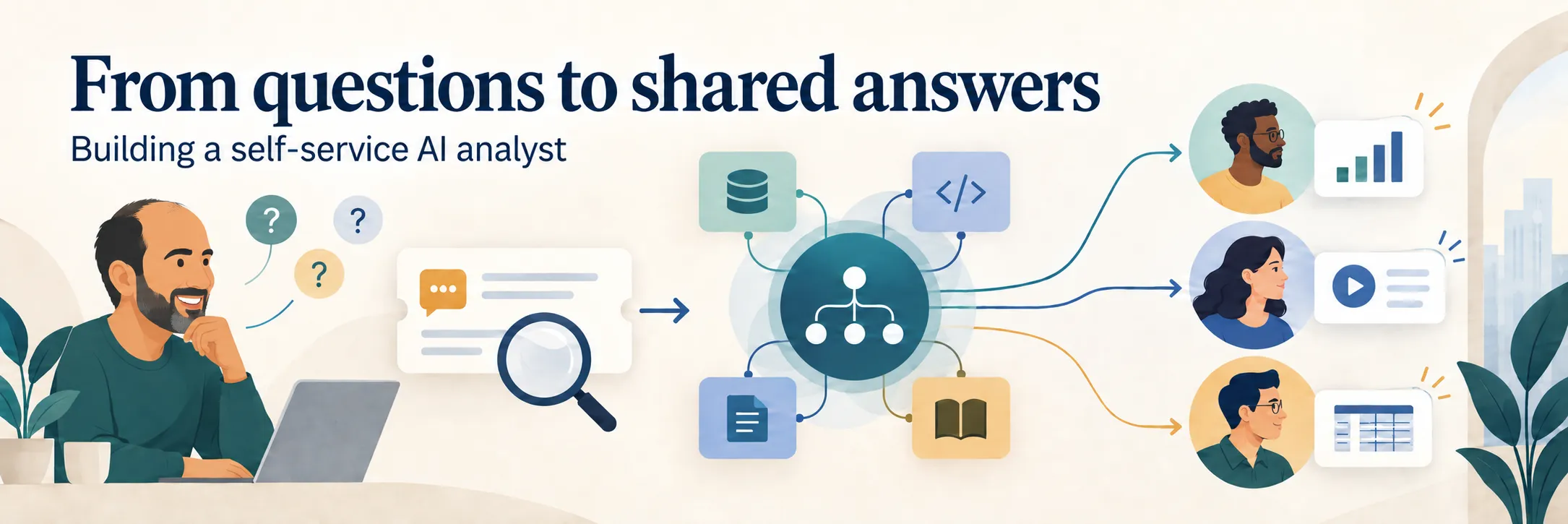
As a product leader, I spend a lot of time answering questions from across the business: customer support, marketing, engineering and the executive team. The work behind an answer can involve digging into individual customer sessions to understand reported issues, gathering aggregated usage data across features or verifying how a feature was implemented in production.
At Evertune, I designed and built an internal AI analyst, powered by a custom AI Agent and agent harness, to help me more efficiently answer questions spanning product analytics and operational intelligence. It started with one support problem, expanded around recurring questions I received and became a tool colleagues could use directly.
Building both the agent and the software that coordinated its work gave me hands-on experience with agentic AI. It forced me to work through the practical issues involved in turning a prototype into something useful inside an organization, and shaped how I think about AI-native product leadership.
Making a bug investigation easier
During a sprint retrospective, an engineer said they wished they could see what a customer had been doing when they filed a support ticket. We were investigating slow-loading analytics screens, but reports often omitted the steps taken, the page involved or the message on screen.
We already had session recordings through a lightweight app analytics package I had asked the team to implement a few months earlier. Finding the right recording among a heavy user's many visits took a decent amount of work, and doing so only added tasks to the issue triage plate.
Using Claude Code, I built a cloud-hosted chat interface where someone could paste a ticket link. The system identified the customer, found candidate sessions and used the ticket timing and context to identify where the issue most likely occurred. It then returned a replay so the team could watch the problem unfold.
The productivity gain was in the workflow: the tool connected the ticket to evidence that previously required manual searching across separate systems. The engineer could then begin their investigation with a clearer picture of the customer's experience.
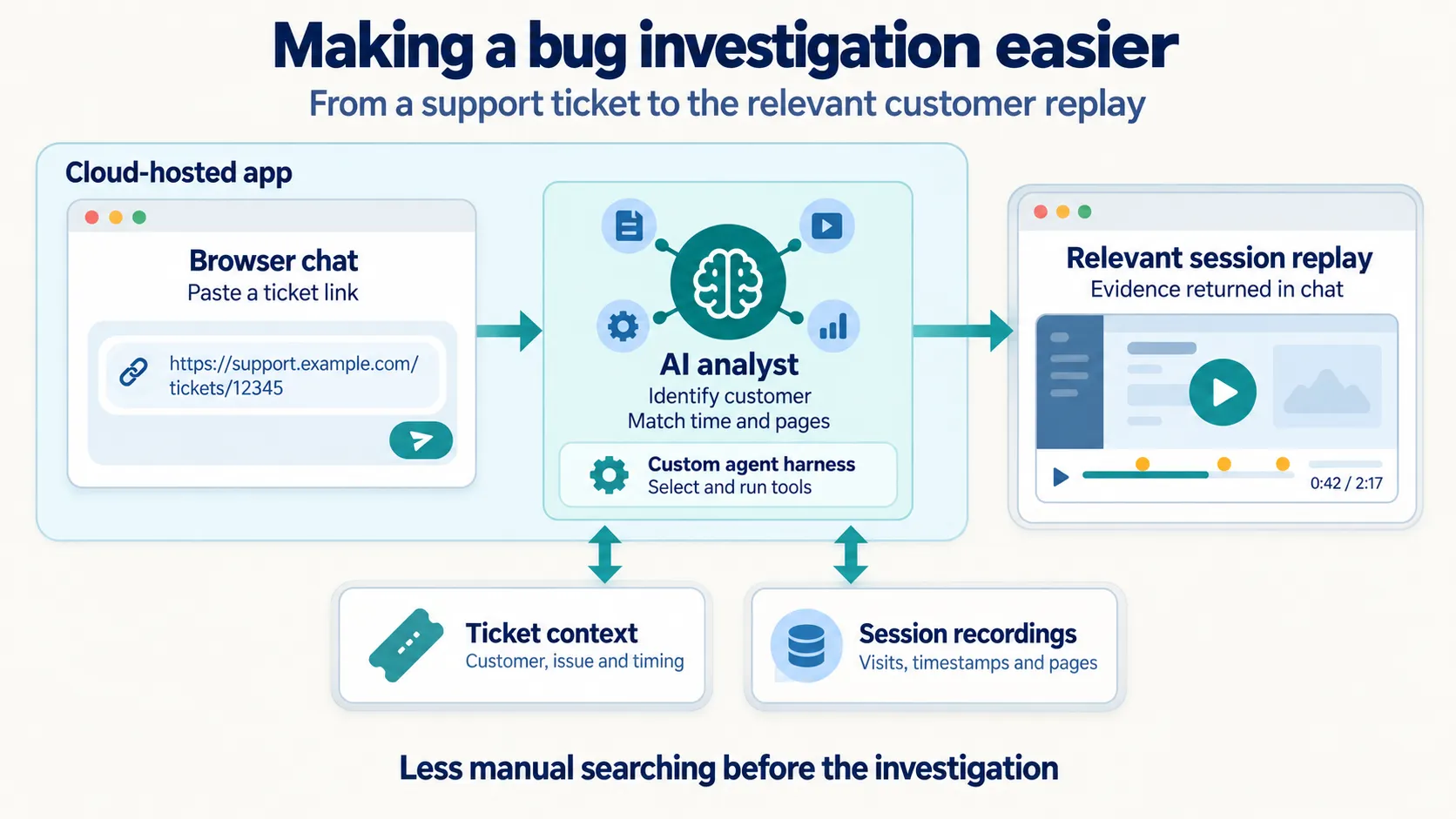
The AI analyst connects a support ticket to the relevant customer replay.
Automating additional analytics
Once I could retrieve a session, I could easily retrieve and inspect the surrounding backend events and service-request timing as well. That extended the AI analyst from showing what happened to helping explain why an experience was slow.
At the same time, executives were asking about overall platform usage. The data existed, but each answer required manual investigation of application events and bespoke queries. I extended the analyst to generate aggregation queries and return charts and tables in the chat.
As new use cases emerged, I connected the analyst to product-results data, Jira tickets and the live GitHub codebase. It could answer analytical questions, report ticket movement for work in flight, compare implementation with product requirements and verify what had shipped. Each connection turned another recurring investigation into a reusable capability grounded in real evidence.
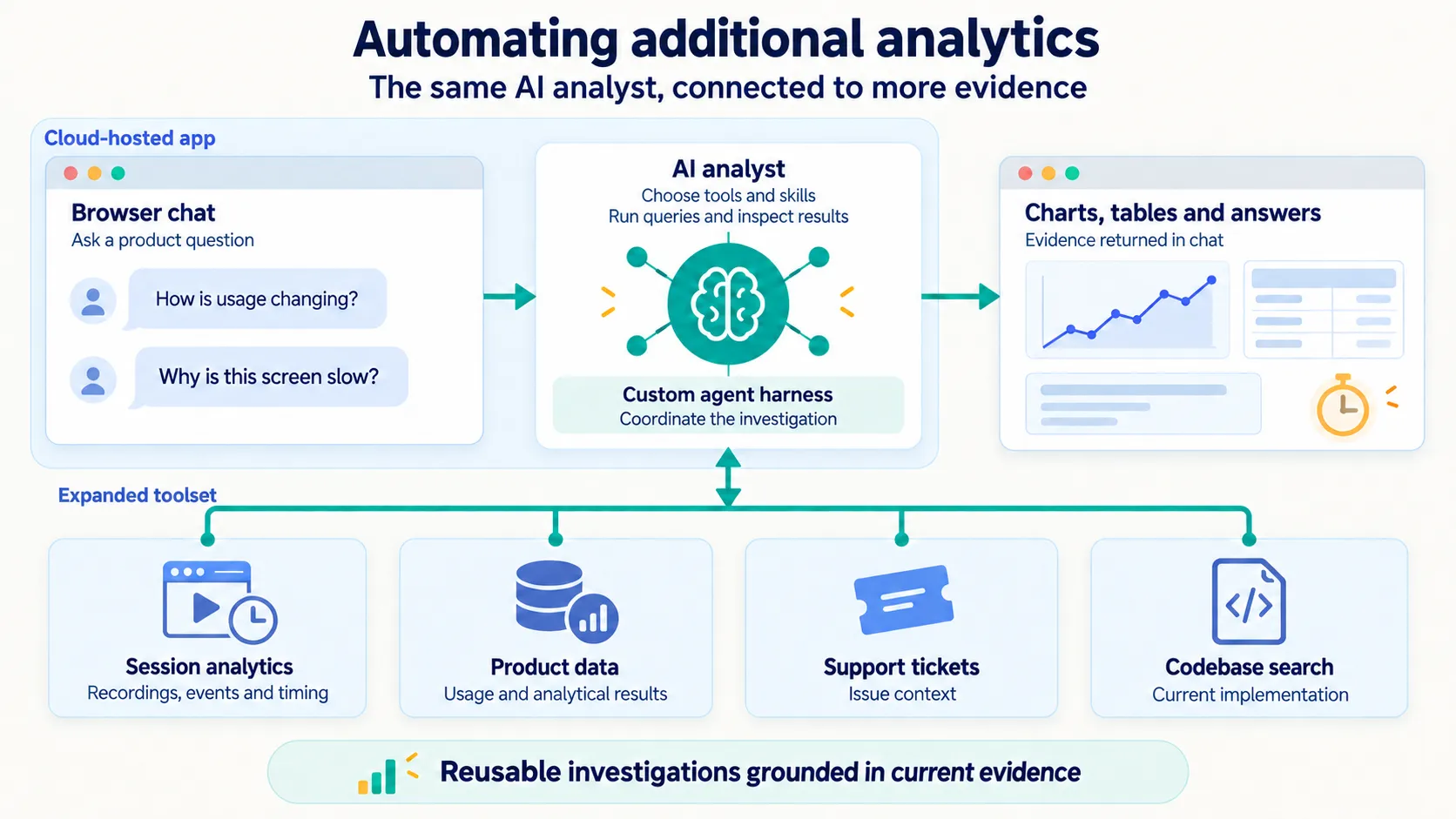
More evidence sources turn recurring questions into charts, tables and answers.
Making my personal analytics tool self-service to colleagues
Once these workflows were available through a secure, cloud-hosted chat interface with corporate sign-in, colleagues could investigate questions directly themselves. They could inspect replays or charts, share conversations and ask follow-up questions with the prior context intact.
This was the next step in the productivity story: making the capability available without every request passing through me first.
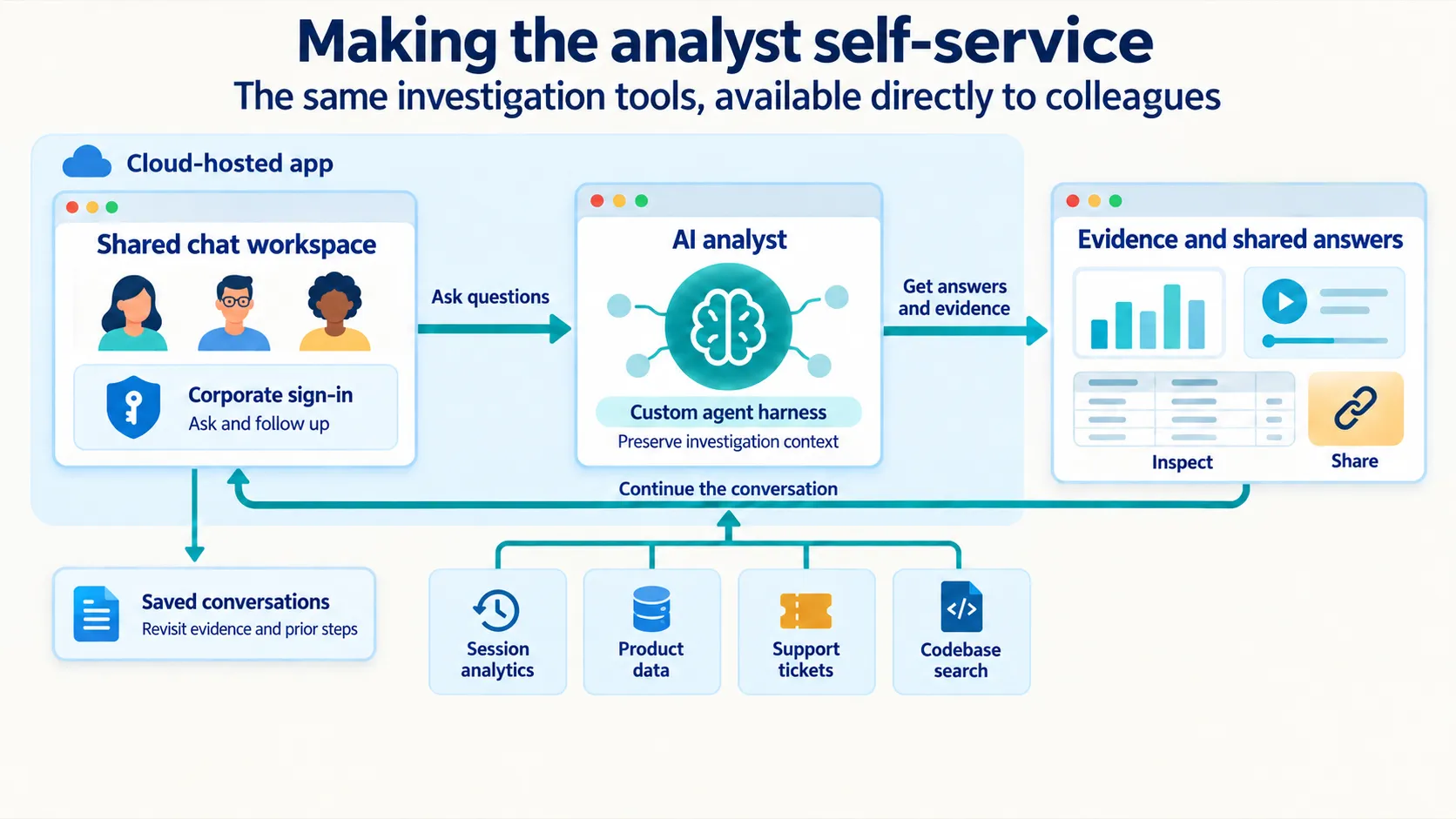
Colleagues can ask, inspect evidence, share the investigation and continue with its context.
I built the AI Agent and its custom harness
I designed and built both the AI Agent and its custom agent harness, using Claude Code and Cursor to help implement the system. I owned the product problem, architecture, design choices and decisions about how it should improve.
The agent used large language models (LLMs) to create a plan, choose appropriate tools, review the results and decide what to do next. That multi-step tool-use loop let it work through questions that needed several sources or follow-up queries.
The custom harness selected relevant tools, coordinated function calls, preserved context, streamed progress, enforced execution limits and recorded what happened. A cloud-hosted browser interface provided chat, session replays, charts, tables, corporate authentication and saved conversations.
I used context engineering to supply specialist guidance, product knowledge and evidence. Persistent memory retained conversation context and saved guidance. Retrieval-augmented generation (RAG) grounded explanations in product documentation, while read-only connections to production systems supplied analytical data as needed.
The system also supported skill-based tool orchestration, multi-provider model routing and fallback (it can run on Anthropic or OpenAI), optional human plan review and observability into tool calls, timing, results and outcomes. Scoped tool access and runtime checks provided guardrails.
For colleagues, those mechanisms supported a simple experience: ask a question, inspect the evidence and continue the investigation. For me, building them turned agent development and harness engineering into practical product work.
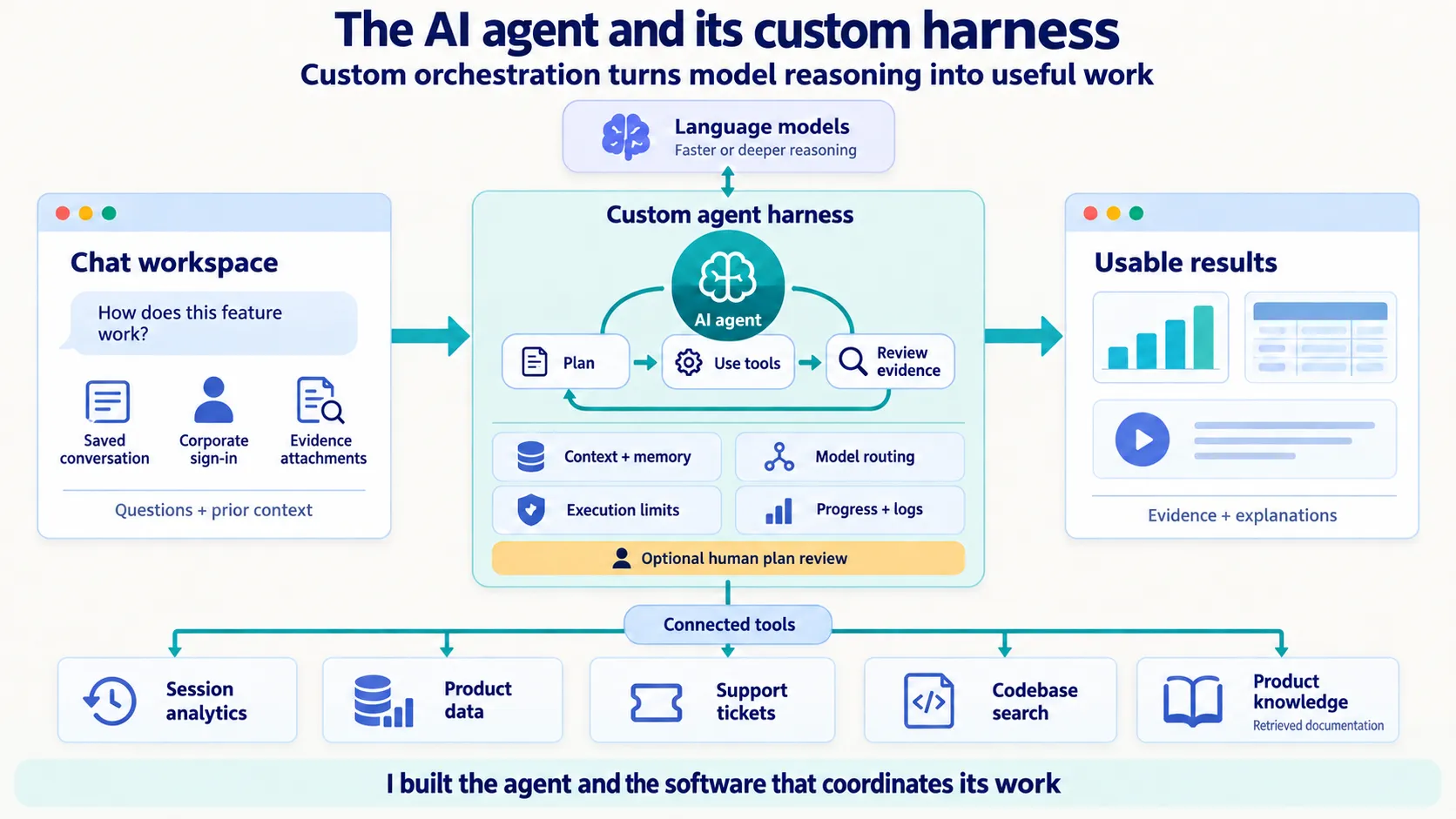
The custom harness coordinates model reasoning, tool use, context and execution controls.
Continual improvement
The early versions of my AI analyst answered useful questions, but they were slow. Using highly capable models to plan every request made the experience cumbersome and added cost.
I experimented with matching the model to the job: simpler requests could take a faster path, while harder investigations could use stronger reasoning. I also narrowed the tools offered for different question types, reducing token use and reasoning overhead, which improved results.
Other failures required a different response. Some investigations returned too much data to display. Others misunderstood how information was organized or took an unproductive sequence of steps.
I logged the questions, tools called, results, timing and outcomes. Reviewing recorded agent traces (the steps, tool calls and results) gave me a practical evaluation loop. Comparing failed investigations with similar successful ones helped me improve tool descriptions and recommended paths. I built a playbook with guidance for how certain questions should be investigated, making future Q&A with the AI analyst more reliable.
Some example issues
One archived investigation captured repeated attempts to chart daily usage for an enterprise customer. The answers were undermined by incorrect user grouping and test accounts appearing in the results. The proposed improvement made the definition and retrieval steps explicit. It was a useful reminder that automating a question also requires defining what a correct answer means.
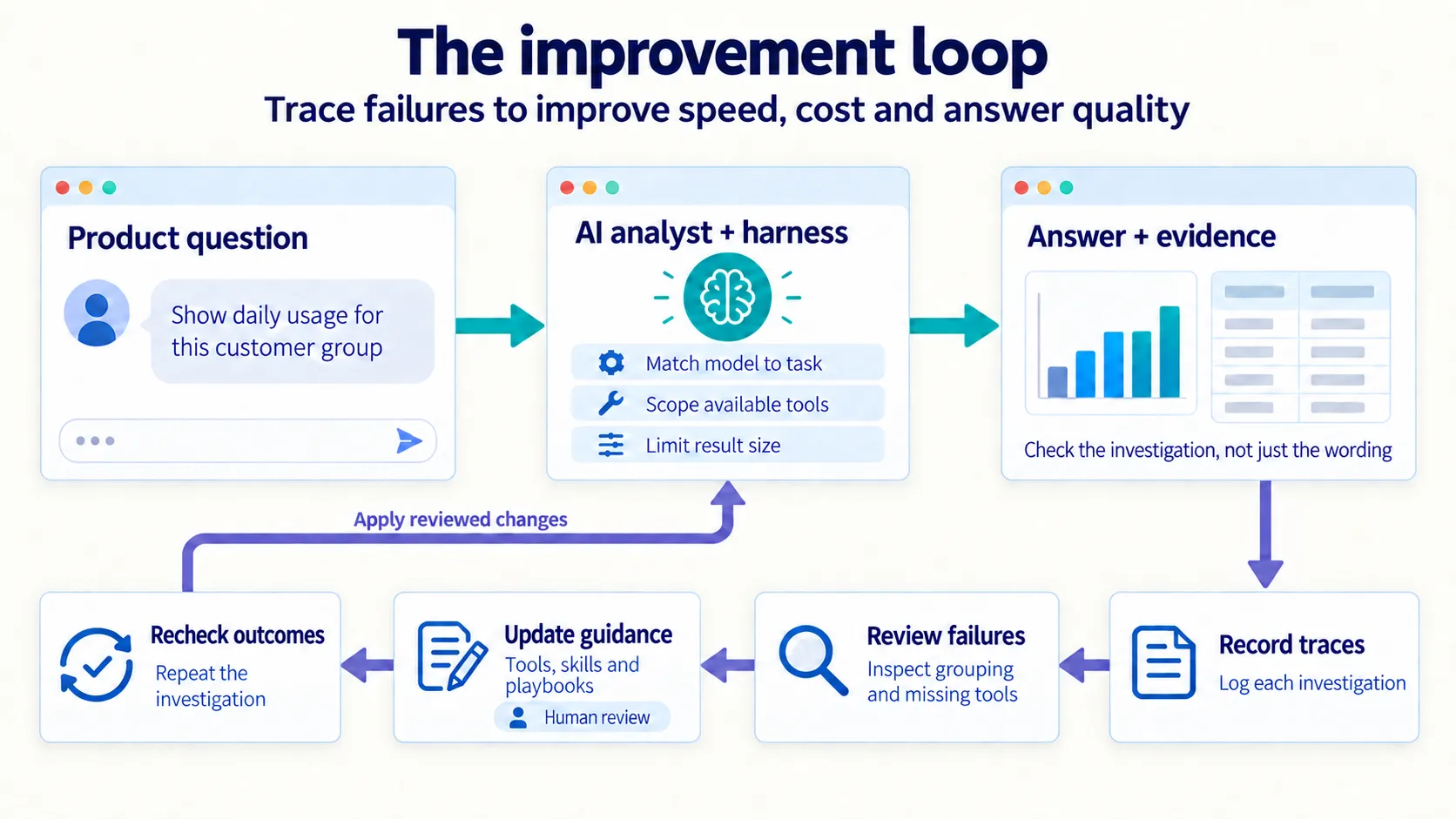
Reviewing actual investigations helped me decide what to change and what to check again.
One failure was especially revealing: codebase-search tools existed, but a missing routing entry meant the model was not being made aware of those tools when codebase questions were posed. The assistant still responded even though the intended capability was absent, and those responses were convincing on their surface, but not when you dug into the codebase manually. This reinforced a practical requirement going forward: judge the system by whether it fully completes the user's investigation, not just whether it provides a plausible answer.
What this means for my product leadership
The progression from ticket retrieval, to recurring analysis, to team self-service gave me experience turning my personal AI knowledge work into a shared capability.
I had to decide what could be reliably automated, what evidence an answer needed, where human judgment remained necessary and how the system would improve through use. I also had to balance answer quality with speed and cost.
Hands-on work in agent development, context engineering and harness engineering has made AI-native product leadership more concrete for me, and the lessons from this project now inform how I approach other products and features as well. I can identify a recurring workflow, build enough to observe it in realistic use and work through what it takes to make it dependable.
That experience helps me test feasibility and product-market fit earlier, identify likely scaling and data-science needs, draft an evaluation approach and estimate project scope. It gives me sharper questions for engineering, greater conviction about roadmap opportunities and a better way to assess the likely impact of AI features.
This is the kind of zero-to-one AI product work I intend to keep doing: finding a valuable workflow, building a usable system, putting it into people's hands and improving it through evidence. It expands how I can contribute as a product leader: answering today's questions faster while creating capabilities that help the team answer tomorrow's.
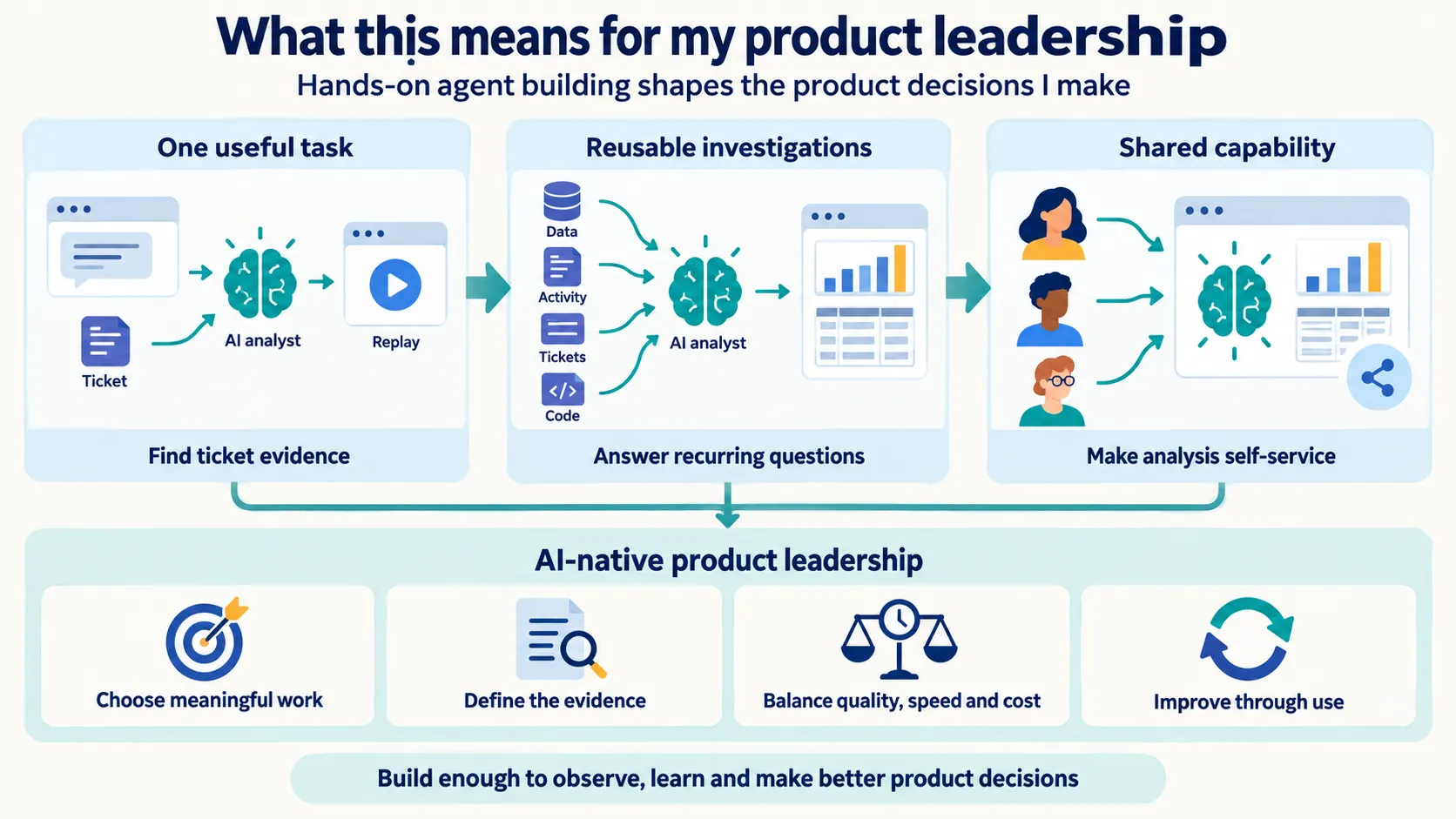
Hands-on building connects task automation, reusable analysis and team self-service to product judgment.
Appendix: the tool categories and implementation
I used an AI coding assistant to help implement the system, while owning the product problem, the design choices and the decisions about what to change when the experience fell short.
The foundation followed a pattern I had used for other internal tools: a browser interface, a Python service running in the cloud and corporate sign-in. React provided the interface for chat, session replays, charts and tables. Managed cloud hosting ran the application. Storage services retained user conversations and investigation logs.
Within that application, AI models interpreted requests and chose among tools that could retrieve information or perform a specific operation. Here, a "tool" means a defined capability (find a session, look up a ticket, retrieve a metric, search a file) rather than giving the model unrestricted access to everything.
Those capabilities fell into several useful groups:
| Type of tool | What it helped someone do |
|---|---|
| Customer activity and session replay | Find the relevant visit, reconstruct what happened and inspect the events around it. |
| Usage and performance analysis | Aggregate activity, investigate timing and turn an open-ended question into a chart or table. |
| Product data analysis | Inspect analytical results, compare breakdowns and explore keyword or brand findings. |
| Reporting and pipeline health | Check whether platform reports were progressing, identify stuck work and investigate data collection. |
| Tickets and codebase search | Read issue context, inspect implementation and investigate what changed. |
| Product knowledge | Retrieve help-center explanations so answers had context about how the product worked. |
| Reusable views and internal app building | Move beyond a chat answer toward dashboards and tools for recurring work. |
This was a combination of familiar software and AI-assisted investigation. The software handled sign-in, data connections, saved conversations and display. The models helped decide which steps to take and how to explain what they found.